
Top 6 Image Resizers for PC and Online
High-resolution footage can often lead to slow loading times and increased storage requirements. This is where image resizers come into play, offering a convenient solution to optimize and scale visuals while maintaining their quality.
The good news is there are dozens of options to help you out. But how do you choose the right service that suits your needs better? Here’s our list of the top 6 tools to resize an image online and offline.
Best image resizers in 2025: comparison table
| Program | Platform | Batch resizing | Presets | Supported formats | Rating |
|---|---|---|---|---|---|
| Icecream Image Resizer |
Windows
|
Yes
|
Yes
|
JPG, JPEG, PNG, BMP, GIF, TIFF
|
5.0 |
| Preview |
MacOS
|
Yes
|
Yes
|
JPEG, PNG, PSD, TIFF
|
4.0 |
| Image Candy |
Online
|
Yes
|
No
|
PNG, SVG, GIF, JPG, TIFF, BMP
|
5.0 |
| Adobe Express |
Online
|
No
|
Yes
|
JPG, JPEG, and PNG
|
4.0 |
| Kapwing |
Online
|
No
|
Yes
|
JPEG, PNG, GIF, and more.
|
3.5 |
| iLoveIMG |
Online
|
Yes
|
No
|
JPG, PNG, SVG, and GIF.
|
3.5 |

How we picked the image resizers
Our criteria encompassed factors such as:
- Custom resizing. The app should allow you to specify dimensions, including width and height.
- Supported formats. The platform should work a wide range of extensions to process different types of depictions.
- Efficiency. The tool should resize images quickly, particularly when working with large files.
To ensure accuracy, we conducted rigorous testing by optimizing the same picture in different programs to measure each app's performance.
1. Icecream Image Resizer
Icecream Image Resizer is a free software available on Windows 11, 10, and older. It allows changing dimensions while preserving the original quality. If you don't know how to properly resize an image, use one of the pre-made presets to adapt your photo for a particular platform (Facebook, Instagram, Twitter, email, etc.).
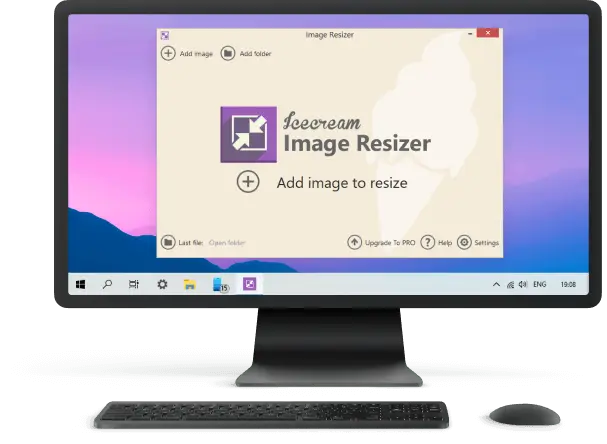
The simple interface lets you easily drag and drop the snapshots you wish to modify into the working area. Now you can select the output format and resolution.
The default parameters are primarily designed for horizontal stills. Working with pictures with other orientation, enable the "Vertical images recognition". The program will automatically detect them and adjust the "Width" and "Height" settings accordingly.
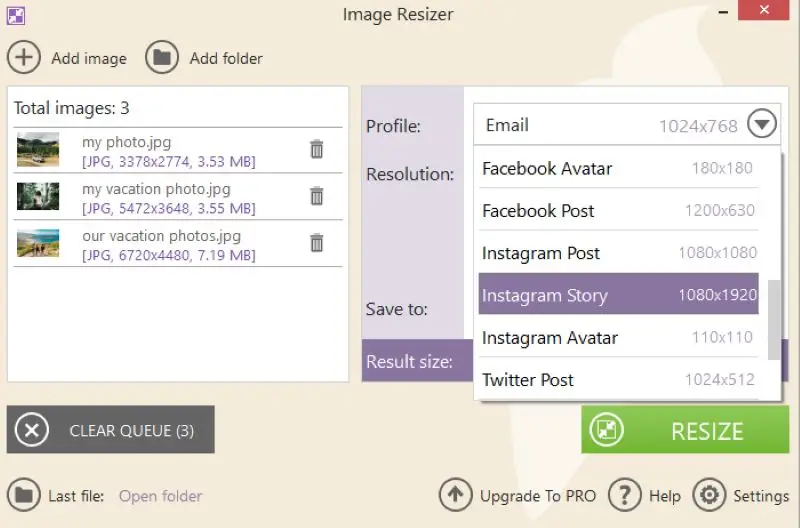
The batch feature of the picture resizer is apart from its competitors. You can rescale an entire folder by clicking the "Add folder" button. The program also provides you with the estimated size calculated for the selected preset.
Advantages
- User-friendly interface. Has an intuitive GUI, making it easy for individuals of all skill levels to navigate and utilize the program effortlessly.
- Bulk processing. You can batch resize images or work on them one by one. It will allow you to save time and effort when working with multiple visuals.
- Presets. The service includes preset profiles for popular apps and websites like Facebook, Twitter, Instagram, and more. This feature eliminates the need to reformat media manually to fit perfectly on different social platforms.
- Quality preservation. With the image resizer for Windows, you can change the dimensions while maintaining a high-quality level.
- Fast processing. The software boasts high speeds, enabling you to fix width and height efficiently without wasting valuable time.
- Custom watermark. Adding watermarks to assets will protect intellectual property and help with branding and promotion.
- Output settings. Save resized files into a specific folder or subfolder or overwrite the original to prevent confusion or misuse.
- Availability. The most important features of the program are available in a free version. You can upgrade to the PRO to experience extra functionalities.
Overall, Icecream Image Resizer provides an outstanding solution for those wishing to quickly convert to a new resolution. Its simple interface ensures a straightforward experience for beginners. At the same time, its adjustable settings allow gurus to modify their results to suit their needs. Give it a try now!
2. Preview
Preview is a pre-installed application on macOS devices that allows to view and edit various types of formats, including PDFs, images, and Microsoft Office documents. Alongside its basic capabilities, the program also enables consumers to resize pictures effortlessly.
All you need to do is open the still with Preview, select "Tools" and scroll down to "Adjust size". You can choose parameters from predetermined dimensions or customize both the width and height via pixels or inches.
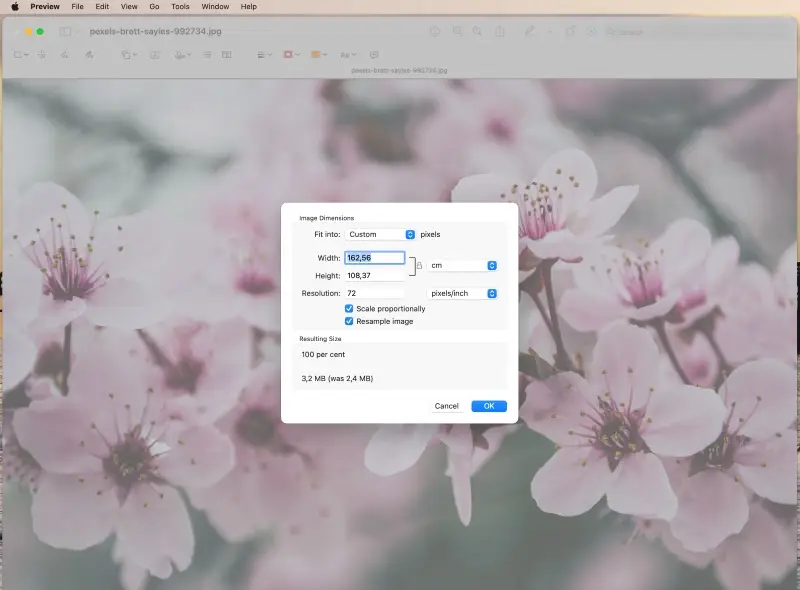
It's important to keep in mind that opting for higher resolutions will result in a larger size of the final footage. Lower dimensions can be beneficial when sharing pics via email or online, as it reduces the time it takes to upload or send them.
The tool also provides the ability to easily resize multiple images simultaneously.
Advantages
- Ease of use. Only takes a few clicks.
- Additional features. You can apply it to crop a photo, combine two graphics, and even edit PDF. Plus, you can utilize it to switch shots between formats.
- Built-in program. The application is already available on your macOS device. You don't have to download or install any third-party utilities. This saves time and effort, so you can start employing the program immediately.
Disadvantages
- Limited capabilities. It can only change sizes in one dimension: by width or height. In other words, you can't easily preserve the aspect ratio, unless you manually calculate the parameters.
While Preview is a great tool for basic image resizing, don't forget that it may not have advanced features. They can be found in dedicated editing software. However, it's free, user-friendly, and offers some instruments that can help improve the quality of a photo.
3. Image Candy
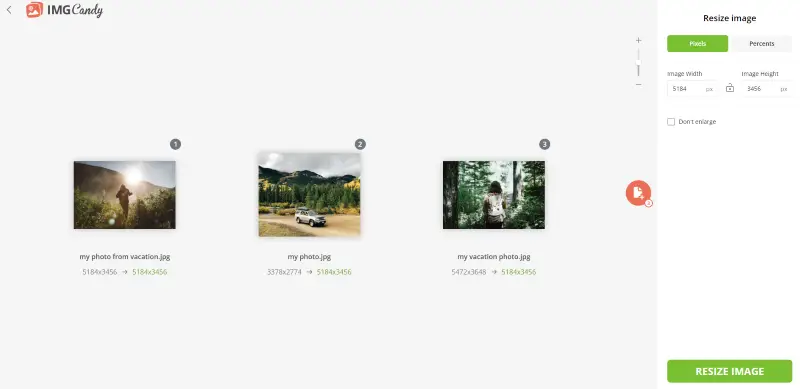
Image Candy is a free online optimization tool. Whether you need to reduce the dimensions of a visual to make it more web-friendly or enlarge it for printing purposes, this service has got you covered.
Picture resizer provides a variety of options to suit your needs. You can choose to upscale the shot by percentage, which is great if you want to transform the footage without compromising its quality. You can shrink the file by 20, 50, or 75 percent.
Alternatively, you can specify the exact numbers you want the painting to be. This is perfect for fitting renders into pre-defined spaces, such as social website banners or media profiles.
Once you've finished customizing your asset, you can quickly preview the new version before downloading it to verify everything looks good.
Advantages
- Free and intuitive. A simple interface makes it easy for users, even those without technical skills, to change image sizes efficiently and quickly.
- High-quality results. With its advanced algorithms, the service can keep artwork sharp after changing the resolution. The tool also supports different formats including JPEG, PNG, and GIF so consumers won't have to convert their files first.
- Additional functionalities. Individuals can flip, rotate, crop, and turn depictions, remove the background, or add text or watermark. This allows them to save time and get all tasks done in one service swiftly.
- Safety. The app doesn't store your drawings on its server, so you can be sure that your data is safe from unauthorized access.
- Efficient. It processes pics quickly and gives immediate results - thus eliminating the need to wait long for their work to be done.
- Cloud-based service. This means that you can apply it from any internet-connected device. There's no need to install the software.
- Batch resizing. Process multiple graphics simultaneously, saving yourself time and effort. You can apply the same settings to multiple drawings, making it an efficient tool for editing large volumes.
Overall, Image Candy is an excellent online instrument for optimizing sketches. It can be used to resize image online for free. Its straightforward interface has plenty of features that streamline the way you design graphics.
If you need a practical method to alter dimensions without consuming much of your time or money, this service is worth having a look at!
4. Adobe Express
Adobe Express is a powerful online utensil that offers a high-quality image resizing option. Utilizing it is effortless and can even be employed on mobile devices.
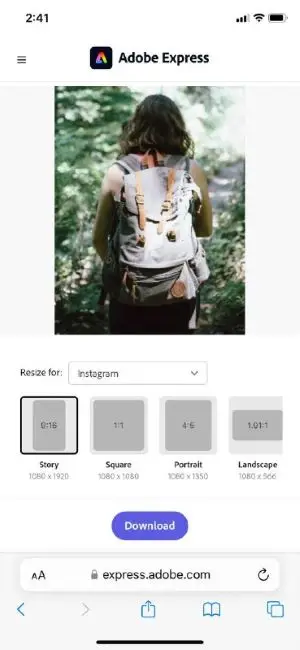
Take advantage of the program to rapidly adapt your photos to any platform. Whether you're creating a profile icon for the web or uploading an avatar to social media, you can adjust the scale of your content with just a few clicks.
You can automatically adjust the file for a specific platform (Instagram, Facebook, Twitter, YouTube, Pinterest, etc.). Alternatively, you can select "Custom" from the list and set the width and height parameters manually.
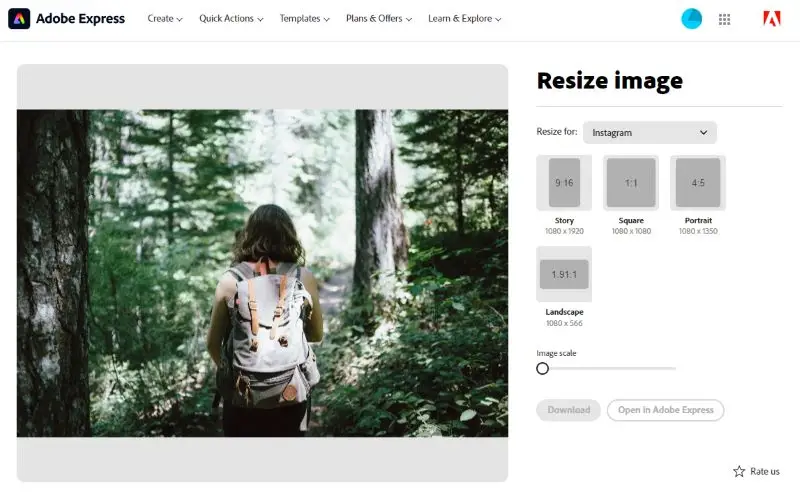
The online image resizer has a range of other features to work on your materials:
- Crop footage, convert them to JPG, PNG, or SVG, and remove the background.
- Merge and reverse videos, tweak the speed and change them to GIF or MP4.
- Modify PDFs by editing text and visuals, organizing pages, or combining multiple documents into one file.
- Create a QR code and paste a link to a website.
Advantages
- Simple interface. The photo resizer has a simple interface. It's a breeze to navigate and has tools to scale their images.
- Powerful features. Crop, rotate, flip, and alter brightness, contrast, saturation, sharpness, and more.
- Automatic resizing. With Adobe Express users can automatically resize pictures for a specific reason with the click of a button. Doing this renders it much faster and easier than manually calculating the dimensions for each.
- Compatible with multiple formats. This product is compatible with various formats. This allows to resize JPEG, JPG, PNG, and other types of graphics.
Disadvantages
- No batch resizing. The service doesn't have a feature to resize multiple images simultaneously. This can be time-consuming if you want to modify a large amount of visuals.
- Size restrictions. The maximum size is limited. It cannot be larger than 17 MB. In this case, you might need to compress the file with third-party services. This additional step can result in some loss of fidelity.
Ultimately, although Adobe Express provides advantages for adjusting digitally, it is necessary to reflect on the drawbacks before using it. This program might not be the best option if you're going to resize larger pictures or if you're looking for a bulk operation.
5. Kapwing
Kapwing is an online tool that lets you upload stills and edit them in a few simple clicks. Even those who are not tech-savvy can quickly understand how to utilize the platform.
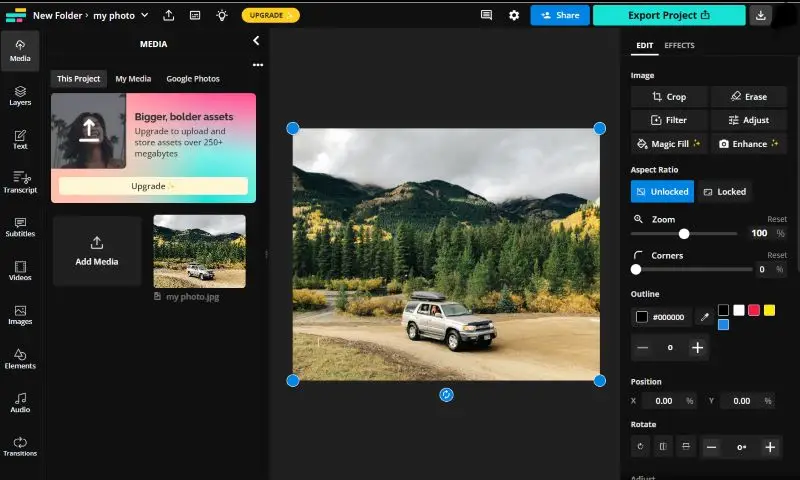
The service offers various methods to suit your specific needs. Whether you want to scale down a footage to reduce its size or increase its dimensions for a high-resolution display, Kapwing has you covered.
You can resize images for a specific platform (Twitter, LinkedIn, Facebook, Instagram, TikTok, or YouTube) or enter a custom number. If you're changing the aspect ratio but don't want to crop the sides, you can either fill the background with a solid color or blurred version of your photograph to avoid empty space.
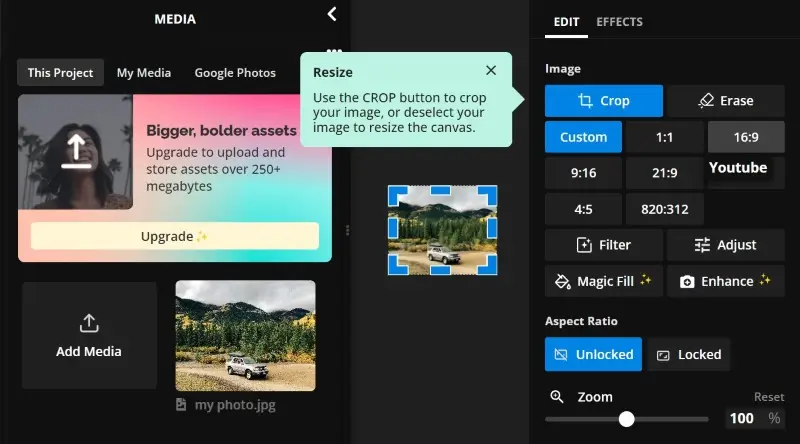
The photo editor provides a variety of tools for adjusting the brightness, saturation, and contrast, as well as adding text, stickers, and filters. If you need inspiration for your project, the service has plenty of free templates.
Advantages
- Flexibility. You can resize PNG and other extensions for different platforms and purposes (social media posts, Instagram reels or stories, YouTube videos or shorts, etc.).
- Collaboration. In this picture resizer you can collaborate with other users. You can invite your team members to work on the same project together in real time.
- Magic fill. This tool allows you to change image size without having to crop the photos. It applies AI to generate the missing areas of the picture.
Disadvantages
- Lower quality. A paid subscription allows exporting results with 1080p and 4K resolution. Free consumers have to choose between 480p and 720p.
- Limitations. The free version only allows access to three recently created projects. Starting a new task will lock your previous one, rendering it inaccessible.
- Watermark. You need to buy a Pro subscription to be able to get files without a mark.
- No bulk resizing. The service lacks batch functionality, which means you cannot fix multiple photos at once.
Overall, Kapwing with its simple interface and editing tools is a beginner-friendly solution for resizing images. While it does offer convenience in certain situations, there are other options available that may provide better results.
6. iLoveIMG
iLoveIMG is a web-based service that provides a variety of tools for working with files. It is designed to be beginner-friendly and offers several functionalities to help manage, edit, convert, and resize photos easily.
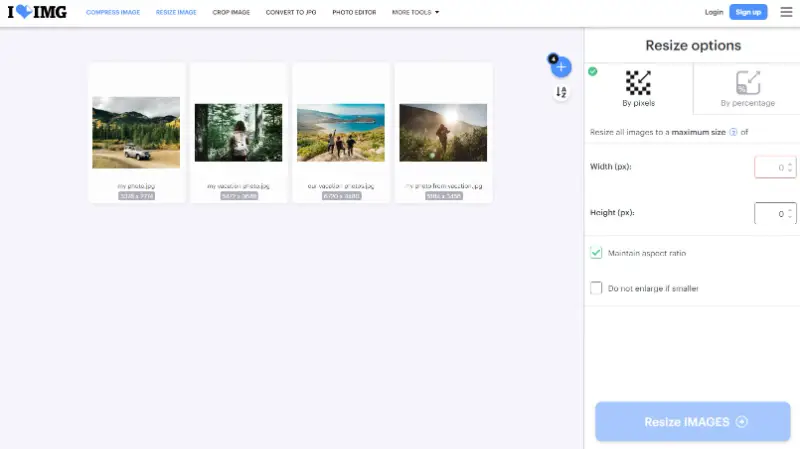
This tool automatically adjusts the height based on changes to width (or vice versa), ensuring pictures do not become distorted. There are 2 options:
- Pixels. Users can specify exact dimensions (width and height) in pixels to recalculate size.
- Percentage. Modify photos by a certain percentage, maintaining the original aspect ratio.
Advantages
- Ease of use. Thanks to its straightforward design, consumers of all skill levels can easily manipulate imagery.
- Time-saving. Batch processing capability allows resizing multiple files simultaneously, saving time compared to working on them individually.
Disadvantages
- Limits. The free version has restrictions of 200 MB and 30 items per task.
Overall, the image resizer tool in iLoveIMG is a convenient solution for changing pictures to specific dimensions, suitable for a variety of personal and professional cases.
Typical image resizing options
| Resolution | Use Case |
|---|---|
| 72 x 72 DPI | Common for online pics, screens, and digital content. Ideal for websites and social media. |
| 150 x 150 DPI | Suitable for medium-quality prints, like flyers, brochures, or presentations. |
| 300 x 300 DPI | Standard for HD print projects such as magazines, books, and professional photos. |
| 600 x 600 DPI | Utilized for detailed printing, like fine art reproductions, high-quality photo prints, or scans. |
| 1920 x 1080 | Full HD resolution, perfect for videos, digital displays, and multimedia content. |
| 3840 x 2160 | 4K, excellent for film production, advanced displays, and high-definition photography. |
| 5120 x 2880 | 5K, best for ultra-sharp visuals on monitors and editing work. |
| 2048 x 2048 | Square format often used for digital art and social media platforms like Instagram. |
| 2560 x 1440 | QHD, favored for gaming, high-definition screens, and streaming media. |
FAQ
- What are the common units used for image dimensions?
- They are typically measured in pixels (px), but other units like inches or centimeters can be applied, especially in print media.
- What is resolution and how does it relate to resizing?
- Resolution refers to the number of pixels in footage. Changing this setting when enlarging can affect the sharpness and detail.
- What is the aspect ratio in resizing?
- This is the measurement of an element's width divided by its height. It is crucial to retain the proportions to prevent distortion.
- What is interpolation in image resizing?
- In particular, enlarging an object essentially creates new pixels to fill the increased space. Interpolation algorithms determine the color and intensity of these new pixels based on the values of neighboring values.
- What is the difference between upscaling and downscaling?
- The first increases overall dimensions, while the second decreases them.
- What is the best file format for resized pictures?
- JPEG is often preferred for photos, while PNG is used for images with transparency or graphics. TIFF or PSD formats may be employed for high-quality resizing.
Conclusion
Changing the height and weight is an essential skill in the digital era where visuals play a key role in communication. Whether you prefer the convenience of online tools or the power of offline software, these 6 image resizers are sure to enhance your photo processing capabilities.
So, choose the one that suits you best and take your image resizing to the next level.

Tech Writer and Photography Aficionado
