How to Make a Meme Online
Memes are everywhere these days. Scroll through your feed, and you can’t miss them — they’re funny, clever, and sometimes brutally honest. Want to get in on the fun? Creating a meme is actually pretty easy, and it’s one of the quickest ways to cheer up your friends or shake up your social media game.
Here’s a quick guide on how to make your own meme from scratch. I’ll walk you through the basics, toss in some handy tips, and show you the best online generator to streamline the process.

What is a meme
A meme is basically a piece of content — usually a picture or a short clip — that spreads like wildfire online. It’s got to be funny, clever, or just spot-on with its message.
Most memes pair a visual with a line or two of text. That’s it. But somehow, they manage to nail inside jokes, trending topics, pop culture, or whatever’s happening in the world right now. The best part? They move fast and are super easy to share.
How to make a meme
Image Candy is an intuitive online tool designed to simplify the process of editing, converting, and resizing images.
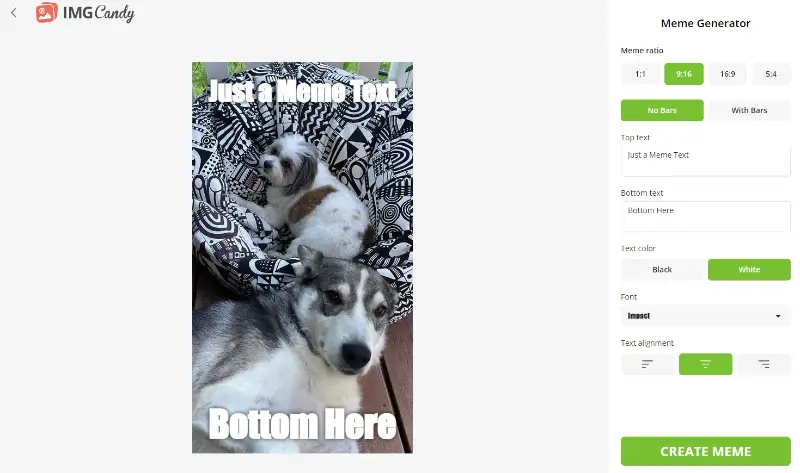
The service provides a free meme generator with a user-friendly interface. This platform allows users to quickly add any text to their pictures. It is perfect for both beginners and seasoned meme creators looking for a straightforward way to bring their ideas to life.
How to create a meme online with Image Candy
- Open your web browser and navigate to the meme maker online.
- On the homepage, click the "Add file" button to upload the photo you want to use. You can also drag and drop your image into the designated area.
- Select the desired aspect ratio for your meme. If your picture does not perfectly fit the selected aspect ratio, you can add bars.
- Enter your text into the top and bottom boxes. Customize it by changing the font, size, color, and alignment.
- Once satisfied with the result, click the "Create meme" button and download the file to your device.
Pros:
- Intuitive interface. Simply drag and drop your images — clear, straightforward, and hassle-free. The clean layout makes navigation easy, even for first-time users. You’ll get the hang of it in no time.
- Customizable text. Add captions effortlessly and experiment with different fonts, colors, and placements until everything looks right. Full creative control is in your hands.
- Aspect ratios. Choose from popular formats like 16:9, 9:16, 1:1, or 5:4 to ensure your meme fits perfectly on any social platform.
- Online access. The meme maker runs directly in your browser, so you can create from any device, anytime. No downloads or extra software — open the tool and start designing on the go.
- No account required. Get started instantly without registrations or passwords. Create memes right away, with no commitments.
- Additional tools. Go beyond memes with built-in editing options. Crop, resize, or blur backgrounds and take advantage of a complete set of useful features in one place.
With these advantages, Image Candy stands out as a versatile and convenient meme generator and general image editor. It offers ease of use and flexibility for both casual and professional users.
Tips on how to make a viral meme
Creating a viral meme often involves a mix of creativity, timing, and an understanding of internet culture.
Tips to make your own meme that has the potential to go viral:
- Know your audience. Shape your idea around what makes your viewers laugh, the stuff they care about, and references they actually get. Memes feel way more powerful when they’re speaking to a specific group instead of everyone.
- Keep it simple. The best memes get the message across in a split second. Ditch the complicated setups and long-winded text. Less is always more here.
- Act on trends. Jump on what’s buzzing right now — big news, viral moments, whatever’s blowing up in pop culture. Timely memes grab attention fast.
- Put a unique spin on it. Sure, familiar templates are classic, but your own twist is what gets people to stop scrolling. Surprise them, flip the format, or go somewhere unexpected.
- Lean into humor. If it’s funny, people will share it. Use irony, exaggeration, or just something totally bizarre — just make sure it actually lands.
- Focus on visuals. Sharp images, clean design, and text you don’t have to squint at do wonders. Don’t clutter the frame — let the meme breathe.
- Invite interaction. Memes that ask questions or prompt people to react get shared more. Start a conversation and watch your reach grow.
- Watch the response. Pay attention to what people say and do with your meme. Use that feedback to tweak your next one — learn what actually clicks.
- Use the right platforms. Post everywhere your audience hangs out — Instagram, X (Twitter), Reddit, Facebook — and tweak your meme to fit each spot’s vibe.
- Stay respectful. Avoid stuff that’s offensive or going to start a fight, unless the satire is super obvious. One wrong step and your credibility’s toast.
- Encourage participation. Let people remix your meme or make their own versions. When the community gets involved, your reach skyrockets.
FAQ on making a meme
- Can I use copyrighted images in a meme?
- This can be risky, but memes often fall under the "fair use" for parody or commentary. However, always proceed cautiously with the copyrighted content usage.
- What’s the ideal size for a meme?
- For images, a 1:1 square aspect ratio (e.g., 1080x1080 pixels) works well for social media. For videos, 9:16 or 16:9 ratios are more common.
- What are the best extensions for sharing memes?
- JPEG is preferred for images with gradients or photographs. This is because of its smaller file size and good quality. PNG is ideal for memes with sharp text and transparent backgrounds. This format it preserves image quality with lossless compression.
- How does color contrast influence the meme engagement?
- High contrast between text and background increases readability. For text, white or yellow on dark backgrounds is common, as it stands out. Conversely, black or dark-colored text on light backgrounds can be effective for memes with bright imagery.
Conclusion on meme creation
Making a meme is not just about adding a funny image to your posts; it’s about expressing yourself and connecting with others in a unique way.
Remember, the key to a great meme is to keep it relevant, relatable, and original.
By following the tips and using the online meme maker we’ve covered, you can turn your ideas into engaging, shareable content with ease.

Tech Writer and Photography Aficionado