How to Avoid Eye Strain from Reading?

Eye strain from reading is a common issue for ebook lovers who spend long hours immersed in digital pages.
Whether you’re curled up with a Kindle, scrolling on a tablet, or using your phone, the constant screen exposure can cause dryness, blurred vision, and fatigue. The good news is that with the right habits and settings, you can enjoy your favorite stories without discomfort.
In this guide, we’ll explore proven ways to reduce reading eye strain and keep your vision healthy.

Why do my eyes hurt when I read?
Prolonged screen exposure
Spending long stretches of time focused on digital text reduces natural blinking, leading to tiredness and difficulty maintaining clear vision.
Blue light impact
The high-energy wavelengths emitted by devices can interfere with sleep patterns and contribute to visual discomfort over time.
Poor lighting and glare
Reading in uneven or overly intense illumination, or dealing with reflections, forces the eyes to overexert, increasing strain.
How to avoid eye strain while reading?
Fine-tuning your setup can make a huge difference in preventing fatigue. Icecream Ebook Reader offers several customization options that let you adapt the display to your needs.
1. Adjusting brightness and contrast
A screen that’s too bright or too dim can quickly tire your vision. Use the built-in brightness slider to match the level to your surroundings, and tweak the contrast so that text remains sharp without appearing harsh.
2. Switching to special modes
- Cold, blue-tinged light can be the reason eyes get tired when reading during extended sessions.
- Night mode replaces bright whites with dark backgrounds and muted text tones.
It is ideal for bedtime to avoid overstimulating the brain.
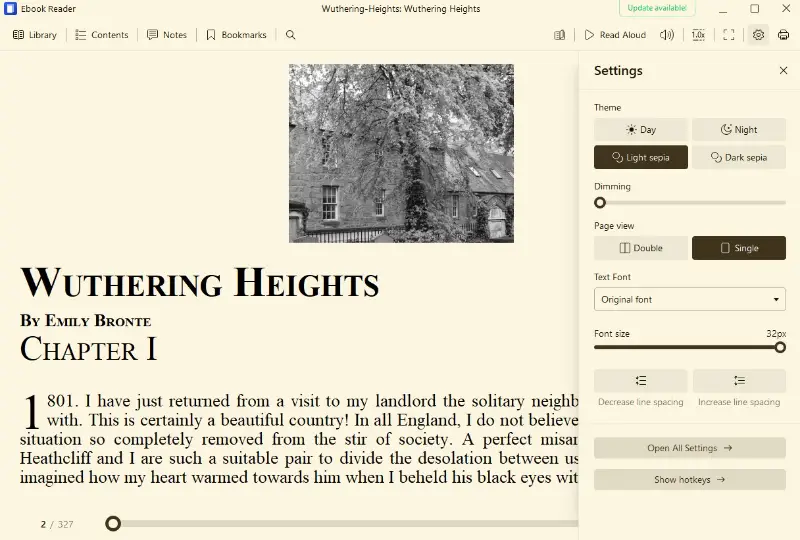
3. Choosing the right font and spacing
Even small adjustments in typography and edits in text can have a big impact. Increase the size and adjust the line spacing to prevent cramped blocks.

Environment adjustments to reduce reading eye strain
The way your space is set up can make all the difference or contribute to eye strain when reading, fatigue, and even headaches.
Proper illumination placement
Think of your lighting as a silent partner in your work. Position sources so that light falls over your shoulder rather than directly into your eyes or onto your screen. For example:
- Put a desk lamp on the opposite side of your dominant hand (to prevent casting shadows while adding notes or flipping through papers).
- Use adjustable arm lamps so you can fine-tune the angle depending on whether you’re studying from paper or a monitor.
Pro tip: Refrain from overhead lighting as your sole source — it can create harsh contrasts and cause eye pain when reading.
Avoiding glare
Glare can be sneaky — it’s not always obvious until your eyes feel tired.
To reduce it, place your desk perpendicular to windows, not facing them directly. This keeps natural light pleasant but doesn't create reflections on screens.
You can also:
- Utilize blinds or sheer curtains to soften bright sun.
- Choose lamp shades that diffuse light instead of letting bare bulbs shine straight into your line of sight.
Even subtle changes to desk orientation can eliminate a surprising amount of visual discomfort and reading eye strain.
Using matte screen protectors
If you spend hours on a digital screen, matte protectors are worth the investment. Unlike glossy finishes, they diffuse reflections and help maintain image clarity in well-lit spaces.
Pair this with slightly increased font sizes and high-contrast text settings for a setup that’s both comfortable and efficient.
Healthy reading eye strain habits
Even with perfect device parameters and lighting, your eyes still need regular breaks to stay comfortable during long sessions.
The 20-20-20 rule
Every 20 minutes of screen time, look at something 20 feet away for at least 20 seconds.
It helps relax your muscles and avoid dryness caused by prolonged focusing on close objects like monitors or phones.
Taking micro-breaks
- Stand up or change position every 30 - 40 minutes.
- Employ the pause to stretch, walk a few steps, or roll your shoulders.
These improve circulation and reduce both body and eye strain when reading.
Blinking to prevent eye strain from reading
When looking at the screen, people blink up to 50% less than usual.
- Make a conscious effort to blink fully and often.
- Consider setting a gentle notification on your device.
If dryness persists, keep preservative-free artificial tears nearby.
Choosing the right eReader
Not all devices are equal, and the type of screen, settings, and features can make a big difference in your experience.
E-ink vs. LCD screens
E-ink displays, found in devices like the Kindle Paperwhite or Kobo Clara, mimic the look of printed paper and don’t emit the same harsh backlight as tablets or smartphones. This makes them far easier on the eyes, especially during long sessions. LCD screens, on the other hand, are brighter and more versatile but can contribute more to fatigue.
Adjustable level and warmth
A good eReader allows you to control brightness and even change the tone. Warmer ones reduce blue light exposure, which not only helps with comfort but also supports better sleep if you read before bed.
Customizable text options
Look for devices that let you change font size, spacing, and margins. Larger, well-spaced text lowers eye strain by making it easier to follow lines without squinting or focusing too hard.
Dark mode
Some eReaders offer night mode, which displays white letters on a black background. While not for everyone, many people find it reduces glare.
EReaders comparison table
| Device | Display Type | Comfort Features | Ideal For |
|---|---|---|---|
| Kindle Paperwhite | E-ink, 6.8" | Variable brightness, warm illumination, water-resistant | Everyday tasks with a balance of clarity and portability |
| Kindle Oasis | E-ink, 7" | Adaptive lighting, ergonomic build, automatic sensor | Long sessions with premium design and comfort |
| Kobo Libra 2 | E-ink, 7" | ComfortLight PRO (blue light reduction), adjustable fonts | Flexible process with a wide range of settings |
| Kobo Clara 2E | E-ink, 6" | Color warmth control, compact size, eco-friendly casing | Nighttime and travel convenience |
| PocketBook Touch Lux 5 | E-ink, 6" | SMARTlight (tone adjustment), lightweight frame | Budget-minded readers seeking eye-friendly features |
Picking the right eReader depends on your habits.
- If you read for hours, a model with an ergonomic design and adaptive lighting, such as the Kindle Oasis, can help.
- For portability, the Kobo Clara 2E is compact yet versatile.
- Those who want eco-conscious materials or affordability may prefer Kobo and PocketBook.
- Kindle Paperwhite remains a well-rounded choice for most scenarios.
Eye exercises and relaxation techniques
Taking a few minutes to stretch your muscles can make a big difference in reducing tension. These quick techniques for how to stop a headache while reading are easy to fit between chapters and highlights.
Near–far focus
Switching focus helps prevent your eyes from locking in on close-up text.
- Look at something near you (your screen) for 10 seconds.
- Shift to a distant object (like a picture on the wall) for another 10 seconds.
- Repeat 4 - 5 times.
Rolling sequence
Gently roll your eyes in a circular motion to release stiffness.
- Start clockwise for 15 seconds.
- Then reverse counterclockwise.
- Keep movements slow and smooth.
Blinking exercise
When concentrating, blinking slows down. Training yourself to blink more can restore moisture.
- Close eyes tightly for 2 seconds.
- Open wide and blink rapidly for 5 seconds.
- Do this every 20 minutes.
Palming relaxation
A classic method that calms both eyes and mind.
- Warm your palms by rubbing them together.
- Cup them lightly over your closed eyes.
- Sit in darkness for 1 - 2 minutes, breathing slowly.
Can reading cause constant eye strain?
Most cases can be managed with simple adjustments and healthy habits. However, some symptoms signal the need for expert care. If you notice any of the following, schedule a doctor appointment:
- Persistent discomfort – Ongoing soreness, burning, or dryness even after resting your eyes.
- Frequent headaches – Recurring tension around temples linked to reading sessions.
- Blurred or double vision – Struggling to keep text sharp, or images appearing to overlap.
- Increased light sensitivity – Problems with normal lighting conditions or finding screens unusually harsh.
- Difficulty focusing – Trouble shifting between near and far objects or keeping concentration.
Conclusion
Maintaining eye comfort while reading ebooks is all about balancing your passion for digital tools with mindful habits.
By adjusting device settings, taking regular breaks, and practicing simple eye exercises, you can prevent strain and protect your vision in the long term.
Remember, your eyes are your most valuable tool — treat them with care so you can continue enjoying every word, chapter, and book without discomfort.
Expert Tech Writer